
Features
How to open multiple URLs at once in Safari: 3 ways
Safari cannot open a pasted list of URLs by itself. Build a shortcut with Get URLs from Input and Open URLs, keep the links in a bookmarks folder and use Open in New Tabs, or paste the list into MultiOpen and tap Open all.
The three ways side by side
| Shortcuts | Bookmarks folder | MultiOpen | |
|---|---|---|---|
| Setup | Build the shortcut once | Bookmark each link | Turn on the extension once |
| Pasted text with links | Yes, with Get URLs from Input | No | Yes, Paste then Add URL |
| Opens in | Default browser | Safari | Safari |
| Pause between tabs | No | No | One by one |
| Load tabs only when viewed | No | No | When viewed |
| Open in parts | No | No | Open in batches of |
| Keep the list for later | No | Yes, the folder | Yes, up to 12 Sets |
Way 1: a shortcut
- In the Shortcuts app, create a new shortcut and add Get Clipboard.
- Add Get URLs from Input. It keeps only the links from the copied text.
- Add Open URLs. It opens every link in the list, no Repeat with Each needed.
- Copy your list, then run the shortcut.
It opens every link at full speed in your default browser, which may not be Safari. Compared in detail: MultiOpen or a shortcut.
Way 2: a bookmarks folder
Bookmark each link into one folder, then touch and hold or Control-click the folder and choose Open in New Tabs. Good for a list you keep, slow for a list you got a minute ago: Open a bookmarks folder in tabs.
Way 3: MultiOpen
- Copy the text with your URLs: one per line, separated by commas or spaces, or inside a message.
- Open MultiOpen: on iPhone and iPad from the page menu next to the address, on Mac with ⌥⇧O or the toolbar button.
- Tap Paste, then Add URL. MultiOpen finds the links and drops duplicates.
- Tap Open all. Each URL opens in its own Safari tab.
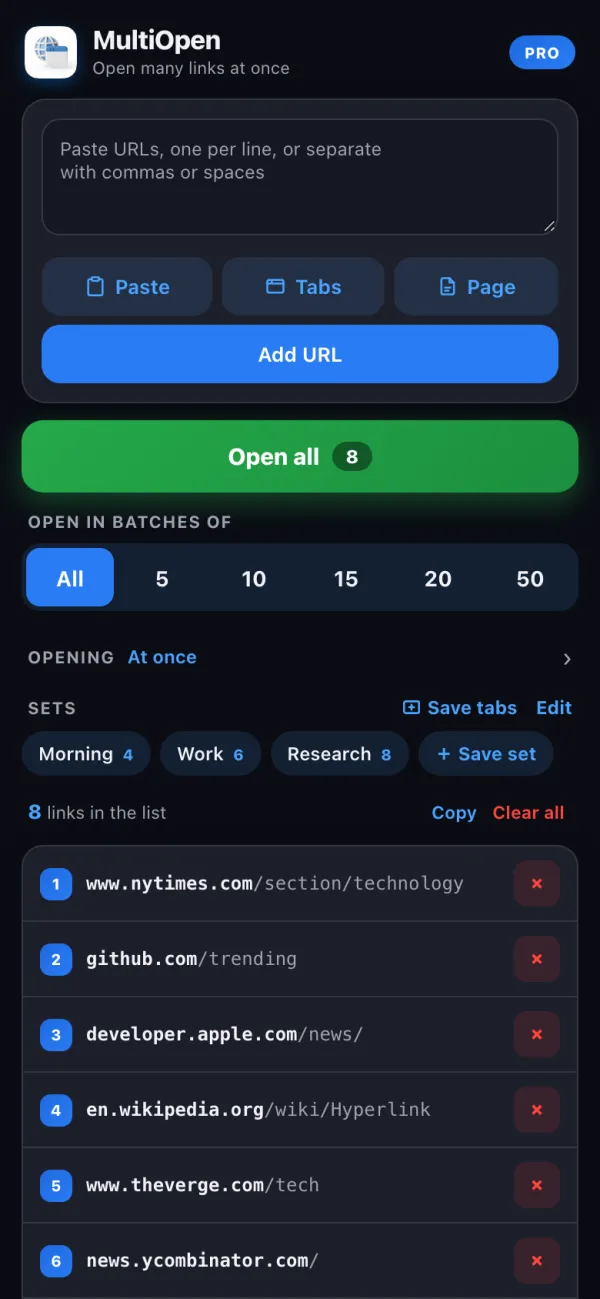
For a long list, choose One by one, When viewed or Open in batches of under Opening: Open 100+ links without freezing Safari.
Questions
Can Safari open multiple URLs at once without an app?
Not from a pasted list. Safari can open a bookmarks folder in new tabs, and a shortcut built in the Shortcuts app can open each URL it finds in copied text.
How many URLs can I open at once with MultiOpen?
There is no fixed limit in the list. For long lists, use When viewed or One by one under Opening, or Open in batches of, so Safari is not asked to load everything at the same moment.
Do the URLs need to be one per line?
No. MultiOpen finds links separated by new lines, commas or spaces, and links inside other text such as an email or a chat.

MultiOpen for SafariiPhone, iPad and Mac · 7-day free trial · Links stay on your device
Get MultiOpen